
On this page
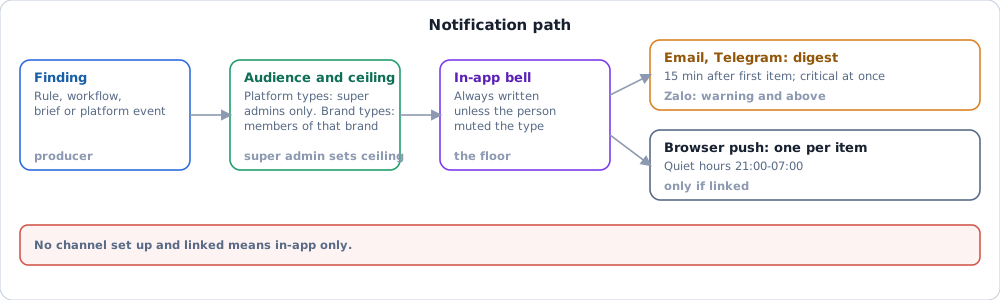
In short. A finding becomes a notification when a rule or workflow fires, and the in-app bell is the floor that every type reaches unless the person mutes it. Email, Telegram, Zalo and browser push are extra copies, sent only through a channel the platform has set up and the person has linked.
How it works#
- Audience. A platform type (failed sync, webhook lag, reconciliation off, AI budget running out) reaches super admins and nobody else. A finding about a brand reaches only members who can view that brand.
- Ceiling. A super admin can turn a type off for everyone or narrow which channels it may use (
/admin/notifications). - Channel availability. A channel must be set up on the platform (
/admin/notifications/channels) and allowed for the organization (/admin/notifications/orgs). - Person's choice. Each member picks types and channels under Settings > Notifications ("Cài đặt > Thông báo"). Every external channel is off until the member links it. With no preference saved, a member gets the in-app copy only.
- Send. The in-app row is written at once. The system records an external send before calling the provider, so a retry or a second worker cannot send twice.
Email uses the sign-in address and needs no link step. Browser push needs the browser's permission. Telegram and Zalo need a one-time code, valid 15 minutes, sent to the bot or official account.
Digest, quiet hours and severity#
| Channel | Sent as | Minimum severity |
|---|---|---|
| In-app ("Trong ứng dụng") | One row per notification | Any |
| Browser push | One message per notification | Any |
| Email, Telegram | One digest per person and channel | Any |
| Zalo | One digest, as a pre-approved template with a count and a link | Warning and above |
- Warning and info items join a digest that opens 15 minutes after the first item and closes at 50 items or 60 minutes. A critical item is sent at once.
- Quiet hours are 21:00-07:00 Vietnam time; items held overnight go out at 07:30.
- An item the person already read in the app is dropped from the digest.
- A condition that is still true does not interrupt again the same day.
Notification types#
| Type (screen label) | Source | Area |
|---|---|---|
| Stockout imminent, Margin collapse, Revenue off its baseline, Return rate rising, Price conflict, Creator spike | Alerts rules for eCom | eCom |
| Rule on your own dataset | Alerts rule on an organization dataset | Any |
| Alert workflow | A workflow the organization designed (Alert workflows) | Any |
| Brief ready | One per person per cadence per day (Signals and the morning brief) | Any |
| Decision review due | A decision whose watch period ended | Any |
| Sync run failed, Reconciliation off, Webhook lag, AI budget running out | Platform | Platform only |
A type is offered in the preference list only if the organization can actually fire it. An organization with eCom enabled but no synced order sees no eCom type. The Alert workflow type appears once the organization has an active workflow. Rule-level mute and snooze live on the Alerts rule, not here.
Where it stops#
Channel setup is a platform task, so a channel can appear greyed out with a reason: not enabled by the platform, not allowed for the organization, or not linked by you. Where each channel stands is dated on Project status.