
On this page
Choose which page members open after sign-in, for the whole organization or for one brand, and which brand is selected for them.
Who can do this: an owner or admin of the organization. A super admin sets the same fields at Organization overview under /admin.
Before you start#
- Pick the page as an admin who can open it: the list offers only pages and dashboards your own role opens, and a page you cannot open is refused on save.
- The Default brand card appears only when the organization has more than one active brand.
Steps#
Default page for the organization:
- Open Settings > Organization ("Cài đặt > Tổ chức").
- On the Default page card ("Trang mặc định") choose a page under Pages ("Trang") or a dashboard under Dashboards ("Bảng điều khiển"). Automatic removes the setting.
- Select Save default page. The toast reads "Default page saved."
Default page for one brand:
- Open Settings > Brands ("Cài đặt > Thương hiệu") and open the brand.
- On the Details tab ("Thông tin") use the same Default page card and save. The brand page wins over the organization's page for members working in that brand.
Default brand:
- On Settings > Organization, open the Default brand card ("Thương hiệu mặc định"), choose a brand and select Save default brand. "No default (all brands)" removes it.
How it resolves#
| Step | What happens |
|---|---|
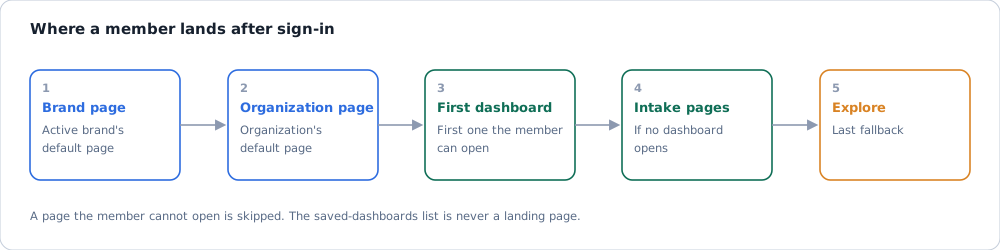
| Sign-in | The member's active brand page, then the organization page, then the automatic page. A page the member cannot open is skipped. |
| Automatic | The first dashboard the member can open, in the organization's sidebar order; then intake pages; then Explore. |
| Brand pinned at sign-in | A member with no brand choice gets the default brand if they may view it, else the only active brand, else all brands. |
| Switching brand | On a dashboard that belongs to another brand, the target brand's page opens. On any other page, or a dashboard the new brand also shows, you stay where you are. |
| Super admin | Always lands on /. |
The saved-dashboards list is never a landing page and cannot be saved as the default.
If it fails#
| Symptom | Cause | Fix |
|---|---|---|
| The save is refused | The page is not open to your role, or the organization does not run that data plane | Pick another page, or ask a super admin to adjust the role at Roles and permissions |
| A member lands somewhere else | Their role cannot open the chosen page, so the next step applies | Choose a page every role opens, or grant the menu item |
| No Default brand card | One active brand only | Create a second brand at Settings > Brands |
| Cards are read-only | The role is not owner or admin | Ask an owner or admin |