
On this page
In short. An alert workflow is a decision you draw: which measure to watch, how to detect a change, what to check next, and whether to raise an alert or stay silent. Together with the standing Alerts rules, workflows are the only source of alerts in the morning brief.
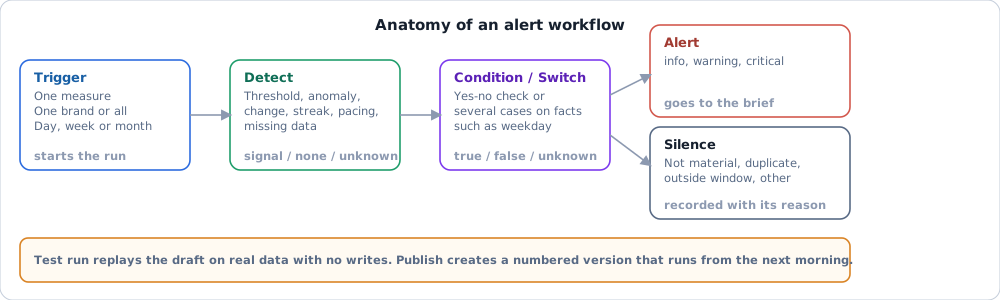
How it works#
Org owners and admins manage alerts under Settings > Alerts & brief; other members open the same page to set their own mute and snooze. The page lists the organization's Alerts rules; Open alert workflows opens the workflow list, the editor and the template catalog.
- Rules and workflows. An Alerts rule is one detection on one series. A workflow chains several steps, so it can say "spend continued, results stopped, and it is not the first week of the flight". A shipped rule can be seen as a drawing through View flow.
- Switch. Each organization-visible rule has an on/off switch, "On for the organization". Switching is logged in the audit log. Rules that no admin switched on stay off. Platform rules are not shown to admins.
- Run. The daily brief job evaluates active workflows first and then writes the brief, so a fired workflow can appear in that morning's brief. It also sends the Alert workflow notification (Notifications).
- One alert per finding. A workflow alerts at most once per period. While its alert is open, a run that would alert again only updates it; a run whose every detection reads as cleared closes it. Only the run that raises a new alert starts the action playbooks attached to the rule, and each playbook step then waits for a person to approve it.
- Period. A workflow judges a day, a week or a month. A week workflow runs Monday morning on the week that just ended; a month workflow runs on the 1st on the previous month. If the closed period has incomplete data, the run is recorded as "not enough data" and raises nothing. Ratios and market estimates are judged by day only; organization datasets by month only.
Blocks#
| Block | Does | Ends in |
|---|---|---|
| Trigger | Fixes the measure and the brand (or the whole organization); optional rest period of 1 to 52 periods after an alert | Next block |
| Detect | Threshold, anomaly against the previous periods, change on the previous period, streak, pacing against target, missing data, level change, trend break | Signal / none / unknown |
| Condition | A yes/no comparison on facts such as the latest value or the weekday | True / false / unknown |
| Switch | Several cases plus "other" | One branch |
| Alert | Raises an alert with a severity: info, warning or critical | End |
| Silence | Stays quiet with a reason: not material, duplicate, outside the watch window, handled elsewhere, other | End |
"Unknown" is its own branch. A missing value is never treated as zero or as false, so the workflow cannot fire on data it does not have.
Build and publish#
- Create workflow, or pick a template under "Alert templates". A template creates a paused workflow; nothing is switched on by creating it.
- Draw the steps on the Design tab. The draft saves as you work.
- Test run replays the draft over the last 14 days, 8 closed weeks or 6 closed months of real data, with no writes, and marks the path each step took.
- Publish turns the draft into the next numbered version. The workflow runs on it from the next morning. Versions are never edited; the Versions tab lists them and the Run history tab shows every past run with its path.
- Use Pause and Resume to stop or restart, Archive to retire the workflow. Archived workflows are read-only and keep their history.
The template catalog groups templates by data type. A template that needs a measure the organization does not have shows "No matching measure in this organization yet"; a template with a badge instead of "Use template" cannot be used yet.
Where it stops#
- Workflows read advertising, marketplace, discussion, market and confirmed organization dataset measures. They do not read CRM or audience data. The status of each is on Project status.
- Only the morning job evaluates workflows. A few operational rules (entity-level, intraday critical) still run every 15 minutes; they appear in the list with the on/off switch and a read-only drawing.
- A workflow chooses severity and message, not delivery. Each person chooses channels under Settings > Notifications.