
On this page
In short. Three screens that a super admin turns on per organization: build a customer segment, push it to an outside channel without exposing a person, and route an order problem to someone. What would leave the platform is a hashed phone or email, never a name or a raw contact.
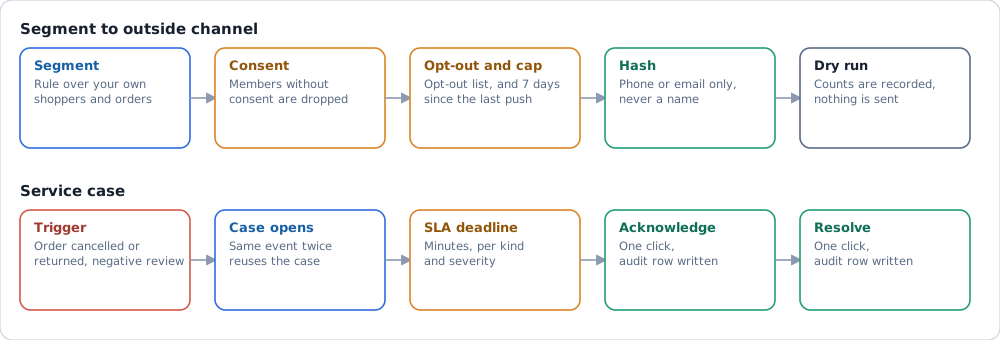
How it works#
| Screen | Answers | Key measures |
|---|---|---|
| Tệp khách hàng (Audiences & Segments) | Who is in this segment, and is it current? | Segments, active segments, members, last refresh |
| Kích hoạt outbound (Activation outbound) | Can this segment reach an outside channel safely? | Considered, no consent, suppressed, capped, pushed |
| Case dịch vụ (Service cases) | Which orders or reviews need a person now? | Open, acknowledged, past SLA deadline |
Segments. A segment is a rule over the organization's own shoppers and orders. It refreshes on a cadence, daily by default, and its card shows the member count and the last refresh. Four templates are suggested: new customers, repeat in 30 days, at-risk in 60 days and champions of the quarter. One click creates one, and from then on it is edited like any custom segment.
Activation. A run picks a segment and a destination. Before hashing it drops members in three stages: consent missing, on the organization's opt-out list, and already pushed on that channel in the last 7 days. The run record keeps counts and duration only.
Service cases. A case opens when an order moves to cancelled (a refund case) or returned (a return case), or when a negative review is ingested. The same event delivered twice reuses the case. Acknowledge and resolve are one click each and write an audit row. SLA rules are set per organization, per kind and severity, in minutes; a case still open past its deadline is recorded as a breach. These events also work as triggers for chains on the Tự động hoá (Automations) screen (Decision engine screens).
What it reads#
| Reads | Never reads |
|---|---|
| Shoppers and orders of the organization | Another organization's shoppers |
| Consent, the opt-out list and push history | Third-party market or social data |
| Order status changes and ingested reviews | Private messages |
Where it stops#
Where these screens stand is on Project status and outbound activation.