
On this page
Open the brief, read what needs attention and why, then act: follow a line to its screen, ask the assistant, or silence a rule you do not need.
Who can do this: every built-in role reads it; switching a rule on or off for the organization is Owner and Admin.
Before you start#
- Your role has the Morning Briefing menu item (every built-in role does by default).
- The organization runs a plane with a declared reader: eCom, Marketing, HR or Warehouse. Market Intelligence, Finance and Content Intelligence write no brief and hide the item.
How often it arrives#
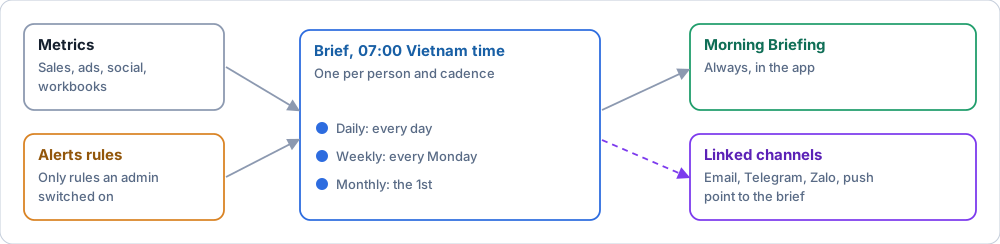
| Brief | When (Vietnam time) |
|---|---|
| Daily | Every day at 07:00 |
| Weekly | Every Monday at 07:00 |
| Monthly | The 1st of the month at 07:00 |
Each person gets one brief per cadence per day, and one "brief ready" notification. Weekly and monthly briefs are the same generator on a longer cadence. A brief ends on the latest day that has data, so a lagging connector shows a "Data through" date ("Dữ liệu đến"), not a sales drop.
Which alerts can appear#
Alerts in the brief come only from Alerts rules an admin has switched on. Outside the demo organization the brief no longer runs its own stock, creator or ad checks, and alert workflows run before the brief is built. An organization that has not switched any rule on sees no alert lines, and nothing is sent.
Steps#
- Open AI Assistant > Morning Briefing ("Trợ lý AI > Bản tin sáng"). An email, Telegram or Zalo message only points to it, and only if you linked that channel in Settings > Notifications.
- Read Urgent signals ("Tín hiệu cần xử lý"): Today, This week and This month side by side, each with its "Data through" date and its prior baseline.
- Read your role's card: a summary and up to four bullets ranked by severity, each naming the rule, the signal and the window.
- Read "not enough data" as unknown, not fine: the rule sat below its evidence floor and did not judge. No bullet means a quiet day.
- Act from the card: Analysis & Suggestion opens the diagnostic chain; Find out with Chat hands the question and the exact date range to the assistant. A proposal waits in Action Queue or Decisions & Lessons for an Owner or Admin.
- Scan the Alert stream; repeats of one rule collapse with a count.
- Press Refresh to rebuild from the latest data. Three refreshes per person in fifteen minutes.
Stop a line from coming back#
| You mean | Do this | Effect |
|---|---|---|
| "This rule does not matter to me" | Settings > Alerts & brief: mute it, or snooze it for 1 day or 1 week | You stop being told; the rule still runs for others |
| "Nobody here needs this rule" | An Owner or Admin turns off On for the organization on that rule | The rule stops for everyone, and the change is audit-logged |
| "This rule fires too easily" | An Admin changes the threshold (Configure alerts) | Fewer firings for everyone |
| "This matters, but not this firing" | Dismiss it with a short reason (Owner, Admin; from the signal ledger or the API) | Withheld for 30 days; two dismissals in 90 days with none acted halve its rank |
The brief page has no dismiss button. A rule that belongs to the platform cannot be switched off by an organization admin.
If it fails#
| Symptom | Cause | Fix |
|---|---|---|
| No Morning Briefing in the menu | The role lacks the item, or no plane declares a reader | A super admin grants the item; check the organization type |
| "No brief today" | The 07:00 run has not produced one, or data has not synced | Press Refresh; check Connectors |
| An expected alert is missing | Its rule is off for the organization, muted by you, or has no data | Check the rule in Settings > Alerts & brief |
| A cadence reads "No sales data for this cadence yet" or stops early | The connector for that plane is behind or disconnected | Fix the connector; the window ends on the last data day |
| A dismissed signal still appears | Different signal key or brand | The 30-day window is per signal key within a brand |
| Refresh says to wait | Three refreshes in fifteen minutes were used | Wait the stated minutes |